Gigabyte MA69G-S3H - a Motherboard based on AMD 690G (Socket AM2) chipset
|
We may assume that users liked the full-size Gigabyte M55plus-S3G based on the GeForce 6100 chipset. That would explain why Gigabyte decided to launch another product of the same form-factor based on AMD 690G chipset. Which looks more appealing from the point of view of demanding users and users of full-size boards. However, the analogy is not complete in this case. Developers have sacrificed board's main advantage - its 4 PCI slots. That number was halved.

The addition of a PCI Express x4 deserves approval. It is connected to a single PCI Express line, but without the divider in the rear part of the slot, which allows installing any graphics card. On the other hand, the extra (third) PCI Express x1 is no reason for excitement. Perhaps, those who want to set up a video output onto 8-12 monitors might find it useful. Provided, of course, that they can buy enough graphics cards like the GALAXY GeForce 7300GT DDR3 PCIe x1. For the rest of the users a single PCI Express x1 (which is kept "in reserve" in 99% of cases) is quite an ordinary feature of any motherboard, including the most expensive ones and aimed at the novelty hunters.
That's what runs across our minds at first glance. Let's see what a more in depth examination can show.
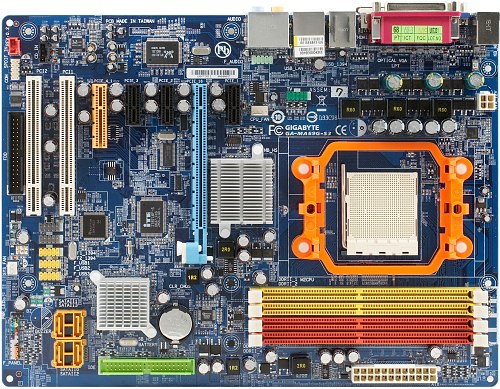
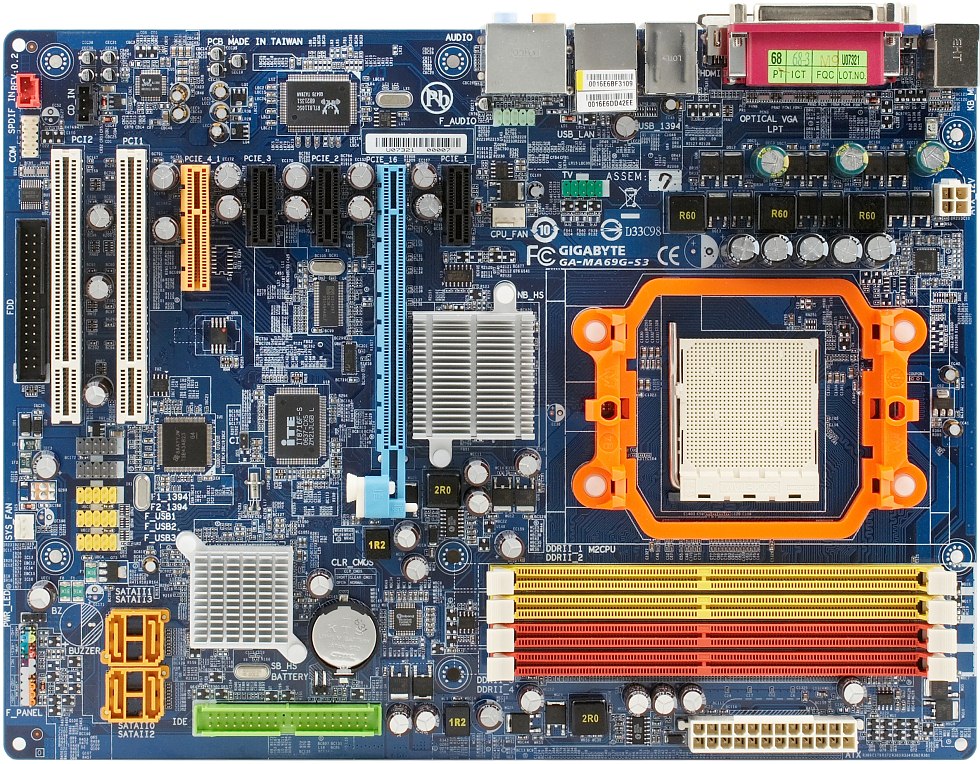
The board's design is good. Yet we still consider the placement of an FDD slot at the very bottom a layout shortcoming. We do acknowledge, though, that the number of computers offered without a floppy drive at all has significantly increased lately. It is worth noting the "tail-end" graphics card restrainer with an extra latch. It is always easily accessible regardless of the size of the card's cooling system.
Chipset cooling in similarity to the other boards based on the AMD 690G chipset is provided by a pair of heatsinks. It is peculiar that the northbridge radiator clearly reflects the artistic ideas of the board's designers, which is somewhat unusual for integrated boards. Naturally, the cooling system does its job well, and, as we have already mentioned, this chipset's heat emission is small.
The thee-channel CPU supply impulse voltage stabilizer uses 4 field transistors per channel, 5 nichicon capacitors of 3300 microfarad and 3 Sanyo capacitors of 1500 microfarad each. The memory supply voltage stabilizer is enhanced by chokes and uses Rubycon capacitors. Both the large overall number of field transistors and, of course, the choice of suppliers is praiseworthy. All of the components allowed for by design are present. This board is at the top of the Gigabyte's series based on the AMD 690G chipset (it isn't hard to guess that the low-end products conform to the Micro-ATX form-factor). The board's size is 305x230 mm (a "narrowed" ATX). It is mounted to the chassis using 7 screws with two corners left unsupported. However, they can be further secured by using mushroom-headed screws and the corresponding holes.
System Monitoring (ITE IT8716F-S, from BIOS Setup Data)
- Voltage of CPU core, memory (1.8 V), +3.3, +12 V;
- Rotation rate of the 2 fans;
- Temperature of CPU (by built-in CPU sensor) and of the motherboard (by on-board sensor);
- CPU Smart Fan - fully automatic mode of rotation rate control for the CPU fan. Control scheme allows for gradual increase and decrease of rotation rate. The maximum rate is reached at 55-60 degrees C. The CPU cooler is compatible with 3- and 4-pin connectors.
Ports, Connectors and Sockets on Board Surface
- Processor socket (Socket AM2 with declared support of all AMD Athlon 64/X2/FX/Sempron processors produced for this socket)
- 4 DDR2 SDRAM DIMM slots (up to 16 GB of DDR2-400/533/667/800, dual-channel mode of operation);
- 1 PCIEx16 graphics accelerator slot;
- 3 PCIEx1 slots;
- 1 PCIEx4 slot (using 1 line of PCI Express);
- 2 PCI slots;
- Power supply connectors: standard ATX 2.2 (24 pins), 4-pin ATX12V for CPU supply;
- FDD slot;
- 1 IDE (Parallel ATA) slot for 2 chipset ATA133 devices;
- 4 SATA-II (Serial ATA II) slots for 4 chipset SATA300 devices, disks connected to them can be combined into a RAID of levels 0, 1 and 0+1;
- 3 bracket headers for 6 extra USB ports;
- 2 bracket headers for 2 extra FireWire (IEEE1394a) ports;
- One header for a bracket with an extra COM port;
- One header for a bracket with a TV-out;
- CD/DVD-drive audio-out header;
- Block of analog audio-in/out connectors for the computer's front panel;
- S/PDIF-In/Out header;
- Chassis intrusion detector slot;
- 2 fan connectors with ability to control rate of rotation, the four-pin CPU fan has "intelligent" rotation rate control through BIOS, 3-pin connectors are supported.
Board's Rear Panel (Left to Right, by Blocks)

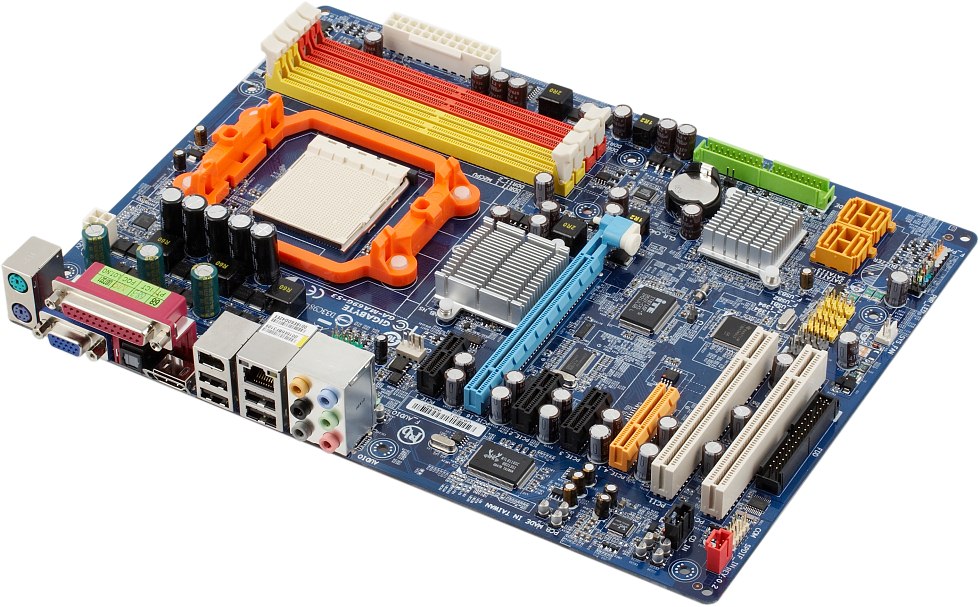
click to view the board in 3/4 perspective from the rear panel side
- PS/2 mouse and keyboard ports;
- 1 VGA, 1 LPT, 1 S/PDIF Out (optical), 1 HDMI;
- 2 USB ports and 1 FireWire (6-pin IEEE1394a);
- 2 USB ports and 1 RJ-45 (Gigabit Ethernet);
- 6 analog audio sockets (Center/Sub, Side-Out, Rear-Out, Line-In, Front-Out, Mic-In).
Package Contents

- Packing: the box conforms to the common S-series style, is smaller compared to the more expensive boards in size (our unit came as part of an OEM package);
- Documentation: a user's guide and a multi-language assembly instructions sheet;
- 2 SATA cables, 1 ATA66 and a cable for connecting a floppy drive;
- HDMI-DVI adapter;
- A bracket for additional rear panel TV-out ports (S-Video and composite) is supplied as an option;
- A rear panel plug that adds corresponding connectors;
- A CD with drivers and brand Gigabyte utilities.
The set of standard utilities includes standard tools for rewriting BIOS in Windows with an ability to search for and download the latest version from the developer's web-site (@BIOS). It also consists of a Web-oriented C.O.M. (Corporate Online Manager) program for remote computer configuration monitoring. EasyTune5 utility for monitoring system parameters is included as well. It also provides overclocking capability: adjusting clock rate and multiplier of the processor, memory multiplier, PCI Express bus frequency, processor and memory supply voltage, but on a smaller scale in comparison to what the BIOS offers. This utility allows modifying SmartFan mode settings. One can choose a range between 0 and 100% or rotation rate and the corresponding boundary temperature values. In addition, one can set power-saving modes and noise parameters with the help of the I-COOL utility. The package also includes Internet Security 2006 and Kaspersky Antivirus 5.0 for protection against viruses and network attacks.
Integrated Controllers
- Audio controller is based on chipset HD Audio support and Realtek ALC888 codec. In the final version of the motherboard this codec will be replaced by 889A with equivalent functionality and, as it is advertised, with an ability to connect 7.1 audio systems, connectors for the front panel audio- ins and outs, S/PDIF-In/Out and CD-In;
- Network Gigabit Ethernet controller that supports rates of 10/100/1000 Mbit/s is based on the Realtek RTL8110SC PCI controller;
- FireWire controller that is based on Texas Instruments TSB43AB23 microchip supports 3 FireWire (IEEE 1394a) ports.
We have evaluated quality of the integrated audio in 16-bit 44-KHz mode using RightMark Audio Analyzer 5.5 testing suite and ESI Juli@ sound card:
| Frequency response (40 Hz to 15 KHz), dB: |
+0.02, -0.09 | Excellent |
| Noise level, dB (A): |
-88.6 | Good |
| Dynamic range, dB (A): |
87.5 | Good |
| THD, %: |
0.0029 | Excellent |
| IMD + N, %: |
0.011 | Very good |
| Channel crosstalk, dB: |
-89.9 | Excellent |
| IMD at 10 KHz, %: |
0.011 | Very good |
Overall rating: Very good. A very nice implementation of integrated audio with, probably, the best codec among the ones found on modern motherboards. However, judging from Gigabyte's plan to replace it with ALC889, there is still some room for improvement.
Brand Technologies and Features
- Q-Flash - rewriting BIOS using a menu that is accessed by pressing F8 at system boot-up. A BIOS image on a floppy disk is required. There is no need to load the OS, which in case of a damaged boot sector would have been difficult.
- Xpress Recovery 2 - restoring a hard drive partition from a previously saved image with the help of a BIOS-integrated utility. This method is only different from using traditional utilities (like Acronis True Image) in not having to boot from a CD. Its capabilities and interface, however, are certainly more modest: in particular, one can store only one image for recovery. This utility is incompatible with disk images created using its first version.
Settings
| Based on jumpers and switches | CMOS reset jumper | To be exact, the board has two contacts that one has to short with a metal object, for example with a screwdriver or a spare jumper |
| Through BIOS based on Award BIOS v6.00PG |
Ability to turn specific CPU functions off | + | K8 Cool’n’Quiet
AMD Live! (Away Mode) |
| Memory timing settings |
+ |
1T/2T Memory Timing, CAS Latency, Write-To-Read Time, Write Recovery Time, Recharge Time, Row Cycle Time, RAS to CAS Delay, RAS To RAS Delay, Row Precharge Time, Min RAS Active Time |
| Memory clock rate selection | + | Auto, 400, 533, 667, 800 MHz (actually sets multiplier relative to HTT frequency) |
| HT bus operational settings | + | Frequency (200, 400, 600, 800, 1000 MHz) and width (8 or 16 bits) |
| Ability to set frequencies of peripheral buses |
+ |
PCIE=100-200 MHz in 1 MHz increments |
| Manual distribution of interrupts by slots |
+ |
|
| Adjusting FSB frequency | + |
200-500 MHz in 1 MHz increments |
| Adjusting CPU multiplier |
+ |
from x5, in integer increments |
| Adjusting CPU core voltage | + | 0.800-1.550 V in 0.025 V increments |
| Adjusting memory voltage | + | +0.05-0.60 V in 0.05 V increments |
| Adjusting chipset voltage | + | +0.025 V, +0.05-0.20 V in 0.05 V increments |
For testing we have used D2 version of the BIOS, which is recommended by the manufacturer. The aforementioned BIOS capabilities are available in the specified version of the BIOS. Non-standard settings were not tested for operability.
As usual with Gigabyte, the complete settings menu is accessed by pressing Ctrl + F1 while in the main BIOS menu. Overclocking options are quite advanced. For a board based on integrated chipset they are even luxurious. There is an ability to slightly increase the CPU core voltage and significantly accelerate the memory.
Overclocking
In order to evaluate the overclocking capabilities of the board and its BIOS, we overclock our testbed CPU to the highest frequency possible that also allows for stable operation. Applying this test procedure, we are able to effectively use all of the test board's supported abilities, including increasing processor core voltage, and if necessary, correcting multipliers and adjusting system and peripheral bus frequencies. However, if lowering Hyper-Transport frequency, for example, doesn't improve overclocking performance, the default multiplier is used instead. RAM is set (by using multiplier correction) to the standard frequency for the modules being used, unless the manufacturer specifies methods for improving memory overclocking, in which case their effectiveness is also explored. In order to evaluate the overclocked system's stability, we load Windows XP and run performance tests built into WinRAR (Tools menu - Benchmark and hardware test) for 10 minutes. It is important to realize that overclocking performance varies by motherboard and is, to some extent, an individual characteristic of each specific unit. For this reason, it is impossible for us, and any other review, to determine the overclocking potential of any board with megahertz precision. The practical goal of our test is to find out if the CPU's high overclocking potential is hindered by the board and to evaluate the board's behavior in non-standard BIOS modes. This test also assesses the board's ability to automatically revert to correct frequencies in the case of system hang-ups, excessive overclocking, etc.
| |
Clock rate, MHz |
FSB frequency, MHz |
Core supply voltage (according to BIOS system monitoring), V |
HT bus frequency (multiplier), MHz |
| Athlon 64 X2 4000+ (2.0 GHz) |
2800 |
280 |
1.55 |
840 (x3) |
Not bad. We must only add that we have used a pre-sale unit, while testing the retail versions might produce better or worse results.
Performance
Testbed configuration:
- Processor: AMD Athlon 64 X2 4000+
- RAM: 2 Kingston KHX7200D2K2/1G (DDR2-800, 5-5-5-15-2T) modules
- Hard drive: Seagate Barracuda 7200.7 (SATA, 7200 rpm)
- Graphics card: ATI Radeon X1900XTX, 512 MB GDDR3
- PSU: Chieftec CFT-560-A12C
- OS: Windows XP SP2, integrated graphics driver Catalyst 7.4
For comparison we have chosen the Biostar TA690G AM2 motherboard based on AMD 690G chipset.
| Benchmark |
Integrated graphics |
Discrete graphics |
| Biostar TA690G AM2 |
Gigabyte MA690G-S3 |
Biostar TA690G AM2 |
Gigabyte MA690G-S3 |
| Data compression using 7-Zip, min:sec |
6:30 |
6:45 |
6:27 |
6:28 |
| MPEG4 (XviD) encoding, min:sec |
5:58 |
6:07 |
6:01 |
6:03 |
| Unreal Tournament 2004 (Low@640x480), fps |
32.9 |
32.5 |
60.7 |
60.7 |
| Unreal Tournament 2004 (High@1024x768), fps |
24.6 |
27.5 |
57.7 |
60.6 |
| FarCry (Medium@800x600), fps |
35.8 |
33.8 |
128.3 |
122.25 |
| DOOM III (Medium@800x600), fps |
14.8 |
14.5 |
136.5 |
135.5 |
Gigabyte's motherboard shows more significant performance degradation in modes that use integrated graphics. This is due to the greater load that the chipset graphics core puts on the RAM in comparison to the Biostar's product. We have already come across such differences between motherboards that use the same chipset. They are probably caused by the differences in BIOS and (which is less likely) in wiring layout. However, it is very hard to notice such a difference unless we run some extra sensitive tests.
Conclusions
In a way, this is a very interesting motherboard. It allows displaying on two monitors without having to install a discrete graphics card (cards!). The second monitor can be connected either via HDMI or DVI. In similarity to Gigabyte M55plus-S3G the board provides all of the useful interfaces, such as FireWire and gigabit Ethernet. It appears that the two boards will coexist in harmony with on another as part of the corresponding series of Gigabyte's products. If a user really needs to install a lot of PCI cards, it will be logical to choose an "older" board. On the other hand, if you are interested in high-performance integrated graphics coupled with low heat emission of the chipset and multi-monitor features then the reviewed solution seems like a natural choice.
The board was provided for tests by the manufacturer
Dmitriy Laptev (lpt@ixbt.com)
October 29, 2007
Write a comment below. No registration needed!
|
|
 |
|
|
|