 |
 |
 |
|
||
|
||
| ||
|
|
|
|
|
||
|
||
| ||
|
Almost everybody who has a mobile phone uses SMS. It's a very convenient and cheap service provided by near all operators in those standards where it's possible. But you feel not so comfortable when keying in with 10 buttons instead of a standard PC keyboard. The T9 program developers promise to help us by offering a predicative input of a text. The T9 technology developed by Tegic company allows to quicken and simplify keying in of a text where a number of buttons are less than a number of letters in an alphabet, for example, in mobile phones and in other mobile devices. Tegic call it Intelligent Typing. The T9 technology was licensed by many companies that produce mobile devices, for example, Motorola, Siemens, Nokia, Ericsson, Beneffon, Nec and others. What is this? Using the T9 system we are pressing the button with the necessary letter only one time. Having typed several letters you should wait until the T9 creates a word. If this word coincides with that you wanted to type just press a space button and turn to the next word. And if not, the T9 will offer some other words made from the letters you have keyed in. In order to choose the right word press the "0" button and set it with pressing of the space button or any punctuation mark. Let's consider an operating principle of the T9 and analog systems with an iTAP system which is used in some models of Motorola. After typing a button the phone will display that letter (among 3-4 letters specified on the button) which is come across most of all, and will display other variants below on the screen. If it has not guessed the letter you have to use "<*" and "#>" keys (instead of the "0" in a classic T9) in order to choose the appropriate letter in the list below. First, such system seems unusual. For example, we used to type the "C" letter by pressing the 2-abc button three times; here it should be keyed in by pressing 2- abc and then "#>" twice. If you will press the 2-abc three times you will just get three letters. Let's consider an example with a word "abandon":
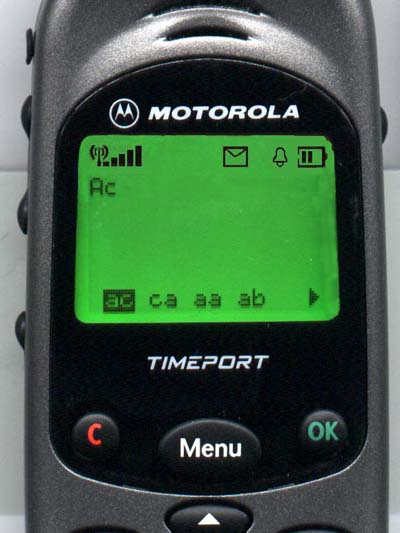 In a classic T9 instead of "ÎK" you will have to press the "#>" button. What does this system give you? When typing this word by a usual method you have to press buttons 15 times, and with this program - just 11. When I was typing this word the second time, the iTAP guessed the third letter with the first attempt - it means that there is some kind of a self-educating system. Besides, if you will ignore arrows below on the screen when typing, the iTAP will try to interchange the last letters (sometimes even all letters) "to its liking", i.e. it will implement those operations which are specified by the developers. Let's take the word "motorola", without using the arrows and ignoring the variants below. Lust look only at the word itself. "motorola":
Or the word "rules":
The complete success! 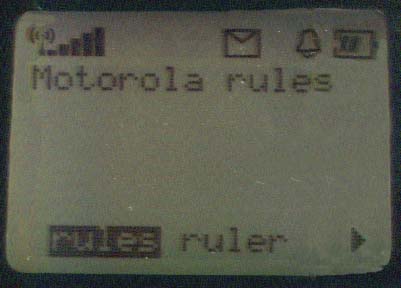 Unfortunately, there are some difficulties. There is a good deal of words that can't be typed without arrows. For example, the word "mainboard".
I failed, but anyway, you have to press 14 times using arrows than 18 in a usual mode. Note that the ">" is pressed 6 times successively, it means that you can just press and hold the button. When you finish typing the word you have to "say" "ÎK", and there will appear a space, and if you want to type some punctuation mark, the iTAP will automatically come back to the end of the word! Another feature is that when typing 2-4 letter words below you will see several combinations (a classic T9). For example, a word "pony": the phone will display "snow", and below you will see: snow pony sony sonw sonx sonz son9, just move the arrow to the right and you will get the required word. But if you have used arrows at least once, or if a word consists of more than 4 letters, the phone will offer alternative words only with the last letters changed. For example, take a "snowman": Snown, and below there will be snown snowm snowo snow6. I.e. at this stage we should replace only the last letter with arrows. As for a number of pressings in a usual mode, I should say that in order to type a letter which stands on the same button with one that I have just keyed in, I (on my phone) have to move the cursor. For example, in order to type "cba", I have to press "C" (three times), move a cursor, then type "b" (2 pressings), move a cursor, and type "A". I know that on some models instead of moving a cursor, you have to just wait a bit, but it doesn't make the process faster, since while waiting you would have typed several letters. That's quite convenient that in any time you can set either usual or numeric input by pressing 2-3 buttons. (Menu - iTAP - Numeric -Tap right while editing). Conclusion. The system in question is undoubtedly worth paying attention to. Thanks to iTAP typing and editing get simpler much more. Some words can be input three times faster that in a usual mode! The T9 and iTAP are not still an alternative to small portable keyboards, but it is still a real breakthrough. I think that with analog systems voice typing in mobile phones is not
so far. Write a comment below. No registration needed!
|
Platform · Video · Multimedia · Mobile · Other || About us & Privacy policy · Twitter · Facebook Copyright © Byrds Research & Publishing, Ltd., 1997–2011. All rights reserved. |