 |
 |
 |
|
||
|
||
| ||
|
|
|
|
|
||
|
||
| ||
|
Asustek company is well known all throughout the world, and in the first turn it's associated with motherboards which often boast of their outstanding characteristics what allowed them to occupy the largest part of the market. But beside motherboards, Asustek produces video cards, CD-ROM's and other stuff. Thanks to a wide range of products, in principle, you can assemble a whole computer with only Asustek's components, but for some details. It will look cool - a stylish case with the Asustek's logo where you can find a CD or a DVD-ROM of the same company, a video card and a motherboard, and if necessary - a SCSI-controller and a network card or a sound card. And if you are a real lover of the company you can buy their notebook and never part with the Asustek products:) Now Asustek is extending the assortment at the expense of less global things which mainly works for the company's image, and widen the Asustek product possibilities supplementing them and increasing comfort while working on a computer. So, today we will concern one of such products - the Asustek iPanel Basic.  Owners of the Asustek motherboards have got a possibility to check the physical parameters of the system - temperature, voltage and revolutions of a fan, and clarify the reasons of failure without opening the case. The iPanel is a small box that is inserted in a usual 5-inch drive bay. Of course, you can say that monitoring of the system has been servicing for a long time already on many modern computers, but earlier it was realized either in applications or as a part of the POST in the form of diagnostic indicators. For example, Abit has a bracket with 7-segment LED indicators locating on the rear panel of the case, EpoX has the same indicator on a motherboard, MSI has 4 ordinary LEDs also located on the rear panel. And now you can examine what's going on inside just looking on your computer. Besides, the fact that USB connectors are located on the front panel simplifies connection of the devices with such interface. The version of the iPanel with "Deluxe" index has, after all, connectors of the serial port and sound connectors - Line-out, Line-in, Mic-in. Besides, the specs of this device include an optional infrared module what is also very pleasant. Moreover, you can start any program with an easy touch of one of 4 buttons that you have programmed before. Now when we are through with a superficial familiarity with the device, I want you to take a closer look at the features. So, here they are: · Diagnostics of a system by tracing POST codes · Indication of frequencies of CPU, FSB and memory · Indication of fan rotation frequencies on CPU, on case and in power supply unit (when connecting them to the corresponding outputs of the motherboard) · Indication of temperature of CPU, motherboard and external sensor · Indication of voltage on the processor core, of the rated voltages +3.3V and +5V · Possibility of starting applications with 4 programmed buttons · With the "ASUS Hotkey" enabled you can set practically any key combinations for starting applications. Now - in depth.  The complete set includes the iPanel itself, two cables for connecting motherboard - one is intended for the AFPANEL connector, the other for the USB connector. Besides, the set includes a user's manual in English with issues on installation of the iPanel into the computer and setting the "Asus Hotkey" software, plus a list of the POST codes. Two diskettes contain the "Asus Hotkey" and the BIOS for the CUSL2 and CUSL2-M motherboards, since in old BIOS you won't find the iPanel support.  The front panel of the device holds 5 buttons - 4 of them are intended for the software (later in depth) and the fifth one - "Mode" - switched the modes of displaying information.  All the modes are displayed with 5 corresponding LEDs - Status, Frequency, Fan, Temperature and Voltage. So, each of the parameters in the displayed mode (for example, in the part of "voltages" - core,+3V and +5V) is shown with lower located LEDs 1, 2 and 3. Besides, there is Msg LED which lights all the time; it starts blinking when a fax-modem receives a message (for this you need the OS with ACPI and drivers' support). On the right of the LEDs you will find USB connectors (in the version iPanel Deluxe there are connectors of the COM-port and audio under The LEDs), on the left of them there is a transparent plastic-covered window hiding 7-segment LED indicators and a table with some POST codes. Some models have an infrared module instead of the table. Inside the device there is a PCB with all the functional elements - in our version of the iPanel Basic we found a lot of unsoldered elements. It's explained by the fact that there is only one PCB used for different iPanel versions.   Connecting the iPanel to our motherboard CUSL2-C I noticed two letters FF, what, according to the instructions, meant that BIOS had delivered control to the OS. The first I wanted to do was to check whether the CPU frequency was displayed correctly - since today we have available a lot of utilities allowing to change CPU parameters without rebooting. So, I used the CPUCool utility which let us change FSB frequency without rebooting. Setting 115 MHz instead of 100 MHz I haven't noticed any alterations in figures of the meter. I decided to disconnect the cable iPanel - motherboard and reconnect it again (in order the iPanel reread it), - but nothing changed with it. So, what did it mean? It seems that the iPanel reads FSB frequency in the BIOS, and not from the processor itself. The other parameters - voltages, fan rotation frequencies and temperature - were displayed correctly. Now comes installation and setting of the "Asus Hotkey" software included in the complete set.  Installation is ordinary: plain questions on future location of the program etc. When installed the program can be found with the icon "hot key" hiding in the system tray - there you can set the system response to button pressing located on the front panel, and key combinations (of the keyboard) for the definite operations. The whole set of possible responses to button pressing contains 8 operations - to start a program, turn up, down or off the volume, switch the computer, start a browser or a post client or do nothing. In the upper right corner of the program you can choose ASUS iPanel buttons or keyboard keys - and then add supplementary "hot keys" (in case of the iPanel buttons it's impossible) or edit the current. 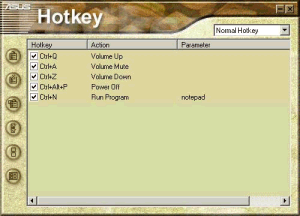 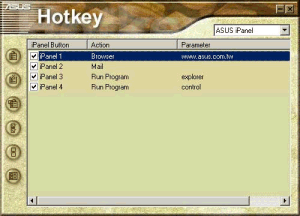 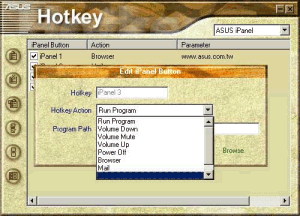 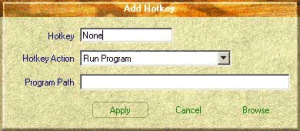 So, as you can see, the set is quite wide - another matter is whether it will be required. As for me, I'd rather use a mouse for the most of these operations:) ConclusionIn general the device is not that bad for an owner of the Asus's motherboard which can be connected with the iPanel - there are certain convenient facilities, and most of all I liked USB on the front panel. If the model had contained the IrDA-module it would have been just perfect :) Information on the CPU/FSB/Mem frequency is ineffective, displaying of temperature, voltages and frequencies is interesting but makes not the best solution without a sound signal on exceeding the rated values - you really won't look at them constantly. And in some critical situations the sound diagnostics would allow a user to trace them and to make a dicision - either change nothing or switch off the machine. The software is a good feature, though it's not that necessary. The price for our model hovers around 20-30 USD and is the main deterrent. For a real lover of ASUS it's interesting, for an owner of a motherboard from another manufacturer it's absolutely unnecessary, and for me the iPanel became another argument that ASUS is one of the most interesting manufacturers of computer components :) Write a comment below. No registration needed!
|
Platform · Video · Multimedia · Mobile · Other || About us & Privacy policy · Twitter · Facebook Copyright © Byrds Research & Publishing, Ltd., 1997–2011. All rights reserved. |